Shared Server
Everything in the previous sections runs on your laptop. That's the fastest way to get started, but when you want your Goalrail accessible from your phone, shareable with teammates, or running while your laptop sleeps, you need to deploy.
This section covers Goalrail's architecture, the options for hosting the server, and the options for hosting the runner.
Goalrail has three components: the server, the runner, and the UI.
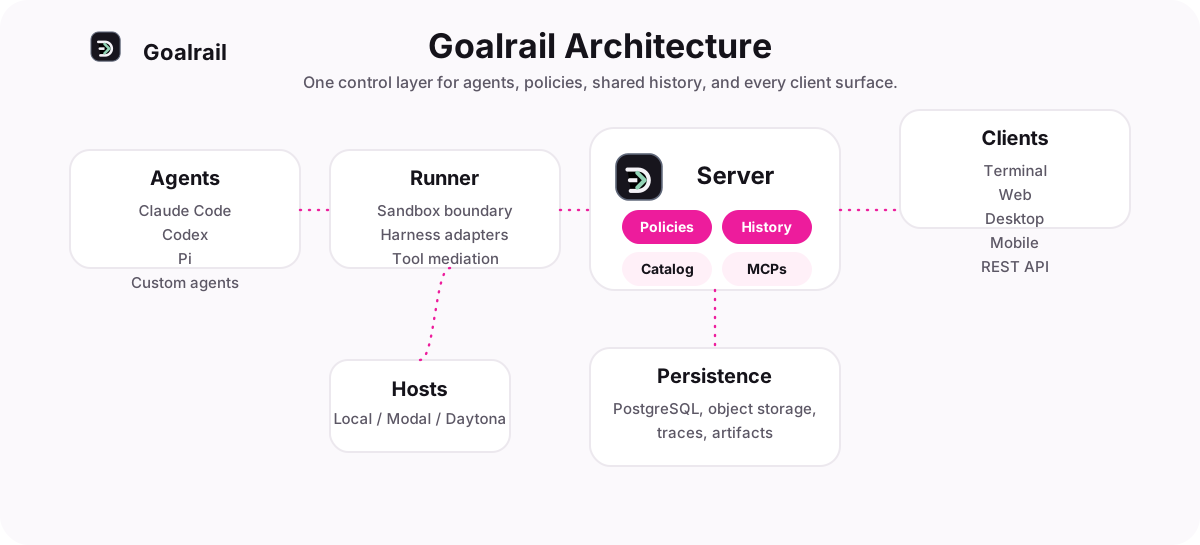
Server
The server is the central coordinator. It manages:
- Session history. Every conversation, message, and tool call is persisted in a database (Postgres or SQLite).
- Artifacts. Files, Goalrail bundles, and uploads.
- Catalog. Registered and built-in Goalrail specs.
- MCP proxy & policies. Proxies MCP tool calls with server-side policy enforcement.
- Skills. Skill definitions that Goalrail can load.
- Auth & accounts. User authentication (built-in accounts or OIDC/SSO).
There are a few options for hosting the server on the cloud:
Docker Compose
Deploy the Goalrail server with Docker Compose. The stack includes the server and a Postgres database.
cd deploy/docker
./bootstrap.sh          # generates DB password + cookie secret into .env
docker compose up -d    # Goalrail server + Postgres
Key variables in .env (See Auth & SSO for details on multi-user auth):
| Variable | Purpose |
|---|---|
DATABASE_URL | Postgres connection string |
GOALRAIL_AUTH_ENABLED | Enable multi-user auth (default: 1 in Docker) |
GOALRAIL_OIDC_COOKIE_SECRET | Session cookie secret |
GOALRAIL_OIDC_ISSUER | OIDC issuer URL (enables SSO) |
GOALRAIL_OIDC_CLIENT_ID | OIDC client ID |
GOALRAIL_OIDC_CLIENT_SECRET | OIDC client secret |
No admin password is auto-generated. On first boot the server reports
needs_setup: open the web UI and create the admin account there, or set
GOALRAIL_ACCOUNTS_INIT_ADMIN_PASSWORD in .env to preset it for headless deploys.
Cloud platforms
Deploy the server to a cloud platform with managed infrastructure.
| Platform | Database | Deploy method |
|---|---|---|
| Railway | Managed Postgres | Import repo from GitHub |
| Render | Managed Postgres | One-click deploy |
| Fly.io | SQLite on volume | fly deploy from CLI |
| Hugging Face Spaces | SQLite (ephemeral) | Docker Space |
Railway & Render. On Railway, import the repo and it handles the
rest, including managed Postgres; Render provisions the app and managed Postgres over
HTTPS via one-click deploy.
Both default to built-in accounts auth, so multi-user works out of the box.
Fly.io. Deploy with fly deploy using SQLite on a persistent
volume. Configuration files are in deploy/fly/ in the repo.
cd deploy/fly
fly deploy
The server idles around ~275 MB RSS. Fly's default 256 MB machine will OOM-loop. The
fly.toml in the repo pins a 1 GB machine. If you changed it, run fly scale memory 1024.
Hugging Face Spaces. Demo-grade Docker Space with SQLite. See
deploy/hf-spaces/ in the repo.
Warning: On Hugging Face Spaces, disk is ephemeral by default and persistent storage is a paid add-on. Data resets on every restart. Use this for demos only.
Runner
The runner is the per-session process that executes Goalrail loops. It manages the harness (Claude Code, Codex, Claude SDK, etc.), runs tools, and streams events back to the server over WebSocket. The server starts runners on a host: a machine you register with the server.
By default, the host is your laptop. Register it with:
goalrail login <server-url>  // if auth is enabled
goalrail host <server-url>
This is why your local Claude Code or Codex installation "just works." Runners started on your laptop have direct access to your machine's tools, files, and credentials.
However, moving the runner to a cloud sandbox host gives you:
- No laptop dependency. Your Goalrail runs even when your machine is off.
- Cloud-native tooling. Your Goalrail can access cloud resources directly.
- Isolation. Each Goalrail runs in its own container, separate from your local environment.
- Scalability. Run many Goalrail sessions in parallel without taxing your machine.
We currently support the Modal and Daytona platforms, with more integrations on the way. Check out the Cloud Sandbox Host page for more detailed setup instructions.
UI
The web UI, terminal UI, and mobile UI all talk to the server. They never talk to the runner directly. This means:
- If the server is on your laptop, UI access is local only
- If the server is deployed to the cloud, any device can reach it, including your phone. Notably, cloud-hosted servers also allow you to collaborate with other users on the same server.
Collaboration
Once the server is cloud-hosted, Goalrail is multi-user: share a live session with a link, let a teammate co-drive your Goalrail, or fork a conversation so someone can continue independently. This has moved to its own page — see Pair Programming for co-drive, sharing with VIEW/EDIT permissions, and forking.